If you only read one paragraph, read this: ViWizard Spotify Music Converter does work, but it is not the effortless one-click solution many review sites make it sound like. In day-to-day use, it is fast enough for normal playlists, keeps basic metadata, and exports to the formats most people want. The tradeoff is that it still depends on Spotify behaving nicely, the trial is too limited to test properly, and it can feel fragile when you throw large batches or app updates at it.
After going through the setup, testing playlist conversion, checking output files, and comparing it with recording-based tools, my conclusion is simple: ViWizard is fine for users who want a downloader-style workflow and are willing to pay for convenience. If your main priority is long-term reliability and fewer headaches, a recording-based alternative such as Cinch Audio Recorder is often the safer pick.
Quick verdict: ViWizard earns points for clean output, decent speed, and beginner-friendly controls. It loses points for the one-minute trial cap, dependence on the Spotify app, and occasional instability with larger jobs. Good tool, not a perfect one.
What ViWizard Spotify Converter actually does
ViWizard is desktop software for Windows and Mac that takes Spotify tracks, playlists, albums, podcasts, and audiobooks and exports them into common audio formats such as MP3, M4A, WAV, FLAC, AAC, and OGG. On the surface, that sounds straightforward. In practice, it is better to think of ViWizard as a convenience layer around Spotify playback rather than some magical quality booster.
That distinction matters because it explains most of the real-world limits:
- You still need Spotify installed and logged in.
- You are still limited by the quality of the source stream coming from Spotify.
- When Spotify changes something, tools in this category can temporarily stop behaving normally.
So yes, ViWizard can turn Spotify playback into local files. No, it does not create better audio than Spotify already provides, and no tool can magically turn a compressed stream into true high-resolution audio.
What I like about ViWizard
1. The workflow is easy to understand
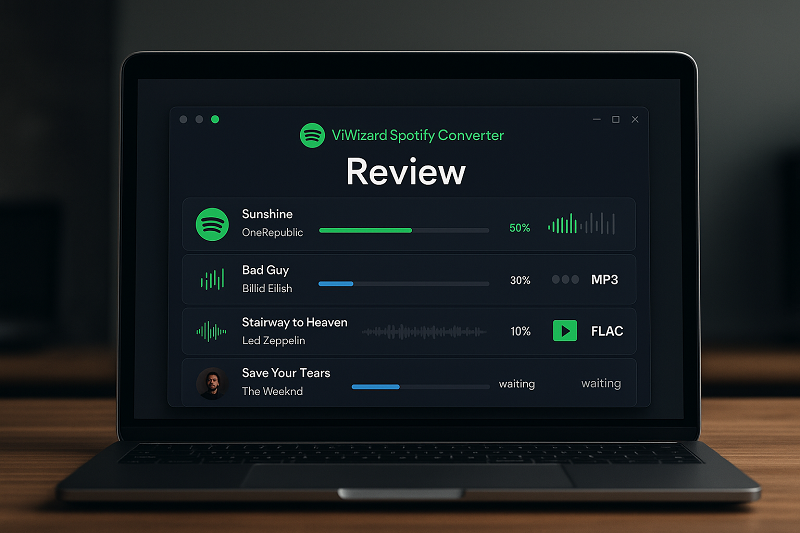
The interface is simple enough that most people can figure it out without digging through a manual. You add songs or paste a playlist link, pick an output format, choose a save folder, and start the process. That is a big reason tools like this stay popular: they remove a lot of the repetitive steps normal users hate.
2. Output settings are flexible enough for normal use
ViWizard gives you the formats most people actually care about. MP3 is there for universal playback, FLAC and WAV are there for people who want bigger files, and M4A or AAC are there for users who live in the Apple world. For someone building an offline library, that flexibility is useful.
3. Metadata handling is decent
For mainstream releases, ViWizard usually keeps the basics in place: track title, artist, album, and artwork. That saves time later because you are not stuck renaming every file like it is 2009. If your library is mostly popular albums and playlists, the tagging is usually good enough.
4. Speed is faster than real-time recording
One of ViWizard’s biggest selling points is speed, and to be fair, it is noticeably quicker than manually recording tracks in real time. In smaller and medium-sized playlists, it moves fast enough that the tool feels convenient instead of annoying.
Where ViWizard starts to annoy people
The free trial is barely a trial
The biggest frustration is the one-minute conversion cap in the free version. That is like test-driving a car in a parking lot and being told you cannot touch the highway. You can confirm the software opens and exports something, but you cannot really judge long-track quality, playlist consistency, or whether it is worth the asking price.
It still depends on Spotify’s ecosystem
This is the practical weakness many glowing reviews bury. ViWizard is not operating in a vacuum. It depends on the Spotify desktop environment, Spotify account access, and the current state of app compatibility. If Spotify changes behavior, these tools often need updates, and users are the ones stuck waiting.
Large batches are where stability matters most
Short playlists are easy. The real test is what happens when you throw a big listening backlog at it. That is also where people start reporting freezes, stalled jobs, or incomplete exports. Even if the tool works 90% of the time, the remaining 10% matters a lot when you are processing hundreds of tracks.
Lossless options can be misleading
ViWizard lets you export to FLAC or WAV, but that does not mean you are suddenly getting more detail than the Spotify source contains. Think of it like pouring supermarket orange juice into a glass bottle. The container is nicer, but the juice is still the same juice. If someone buys ViWizard mainly because they think FLAC output means upgraded sound quality, they are buying the label more than the result.
Real-world performance: what you should expect
Marketing pages love clean numbers. Real usage is messier. Based on how tools in this category behave, here is the honest expectation most users should walk in with:
| Scenario | What usually happens | My take |
|---|---|---|
| Single songs or short playlists | Usually smooth and quick | This is where ViWizard feels strongest. |
| Medium playlists | Generally fine, with occasional slowdowns | Still practical for normal personal use. |
| Huge playlists | Higher chance of freezes or incomplete jobs | Break them into smaller chunks. |
| Podcast or audiobook exports | Works, but trial limits are especially annoying | Hard to judge fully before paying. |
| After Spotify changes or updates | Compatibility can wobble | This is the long-term risk people forget. |
If you are converting 20 to 100 tracks at a time, ViWizard feels acceptable. If you are trying to build a giant archive in one shot, patience and backups become a lot more important.
Audio quality: good enough, not magical
For most casual listeners, ViWizard’s output is perfectly fine. If you export to MP3 at a high bitrate, the files will sound close enough to the Spotify source that most people will not complain. If you export to FLAC or WAV, the files may be larger and easier to manage in certain setups, but do not expect them to sound better than what Spotify originally delivered.
That is the fairest way to describe the audio side: transparent enough for everyday listening, not some secret audiophile upgrade. DJs, obsessive collectors, and users with very strict archive standards should keep their expectations grounded.
Pricing: is ViWizard worth the money?
The answer depends less on the sticker price and more on your tolerance for friction.
- If you only need it once for a small project, the higher upfront price can feel hard to justify.
- If you plan to use it often and you like the downloader-style workflow, the cost may feel reasonable.
- If you want something dependable over the long term, the real question is not price alone. It is whether you trust this category of tool to keep working when Spotify changes things.
That is why some users end up preferring recorder-style tools. They may feel less flashy on paper, but they are often easier to understand: hit record, play the audio, save what you hear. Fewer moving parts can mean fewer surprises.
Who should use ViWizard
ViWizard makes the most sense for people who want a simple library export workflow and do not mind paying for convenience.
- Use ViWizard if you want fast exports, basic tag retention, and support for playlists, albums, and podcasts.
- Skip ViWizard if you hate software that occasionally breaks after platform updates.
- Skip ViWizard if you want a truly meaningful free trial before buying.
- Think twice if your main goal is lossless-quality archiving, because the source itself is still the limiting factor.
Better alternatives if ViWizard feels like a gamble
Cinch Audio Recorder
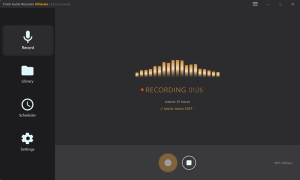
If your priority is stability over flashy promises, Cinch Audio Recorder is the most practical alternative on this site to consider. It records what your system is playing, automatically splits tracks, and keeps the workflow simple. It is especially appealing for users who care more about dependable capture than about downloader-style marketing language.
Other Spotify tools
There are plenty of other Spotify converters around, but many of them share the same weak spots: aggressive claims, limited trials, and update-related hiccups. That is why I would compare them less by their headline features and more by their failure points. Ask: how often does it break, how restrictive is the trial, and how painful is recovery when a batch fails halfway through?
How I would use ViWizard if I had to rely on it
- Test a short playlist first instead of throwing in your whole library.
- Stick to MP3 unless you have a specific reason to export another format.
- Process massive playlists in smaller batches so one crash does not waste hours.
- Check a few files after each batch to make sure tags and track order still look right.
- Keep a backup folder structure from day one so cleanup is easier later.
That sounds basic, but it is the difference between a smooth weekend task and an annoying cleanup project.
Final verdict
ViWizard Spotify Converter is not fake, not useless, and not a scam in the simple sense. It does what it says at a basic level. The problem is that the gap between the sales pitch and the lived experience is wider than many review pages admit. It is convenient when it works, but it is still part of a fragile tool category that depends on another company’s platform staying cooperative.
If you want a quick answer, here it is: ViWizard is a decent buy for users who value speed and convenience more than long-term certainty. If you want the calmer, more predictable route, a recording-based alternative is usually the smarter choice.