Quick Summary
Yandex Music offline mode is not a real MP3 download. This guide compares 5 practical ways to keep songs offline in 2025, from app-only use to recording and fallback tools.
That is the real split here. Most readers are not asking whether Yandex Music works offline. They are asking whether they can keep a file they control instead of staying locked inside the app.
What Yandex Music Offline Download Actually Means
Official offline listening is the safest and most stable route if all you want is music inside Yandex Music. It is also not the same thing as open MP3 ownership.
Think of it this way:
- App offline mode = access inside Yandex Music
- MP3 file = something you can move, archive, tag, and play elsewhere
Three direct calls before you waste an hour:
- If you only need offline playback on the same phone, start with official offline mode. Anything else adds friction for little return.
- If your goal is a usable file for USB, car stereo, or local backup, app-only offline access will not help enough. Go to file-producing methods instead.
- If you already tried a random online tool and got the wrong file, stop gambling. Use a calmer method or buy the music where possible.
5 Easy Ways to Download Yandex Music Offline in 2025
No method here is free, stable, safe, permanent, and high-quality all at once. Pick the tradeoff you can live with.
| Method | What you really get | Best for | Main cost | Main risk |
|---|---|---|---|---|
| Official offline mode | In-app listening only | Commuters who just need music on the phone | Subscription/app dependency | No movable MP3 |
| Recording tools | Real local MP3 file | USB drives, local library, car playback | Time and setup | Real-time capture problems |
| Third-party downloaders | Sometimes direct files | Users willing to test low-trust tools | Mostly free | Instability and trust risk |
| Online tools | Sometimes a quick file | One-off free attempts | Free | Wrong song, ads, bad quality |
| Scripts and advanced workflows | Automation potential | Technical users | Setup and maintenance time | Brittle and region-sensitive |
Method 1: Official offline mode
This is the right answer if your main problem is poor signal during commuting and you still plan to listen inside Yandex Music.
Best fit: you already pay for the service and only care about app playback.
Poor fit: you want a file for another device.
Steps:
- Open Yandex Music and confirm the right account is active.
- Download the song, album, or playlist inside the app.
- Test playback without a network connection.
Why this route is still useful:
- lowest trust and malware risk
- easiest setup
- the least fragile choice
Where it falls short:
- does not give you a normal MP3 file
- stays tied to app and account access
- does not solve USB or local-library goals
Quick take: best for app listening, useless for file ownership.
Method 2: Recording tools
If your real goal is a file you can keep, this is usually the calmest workaround.
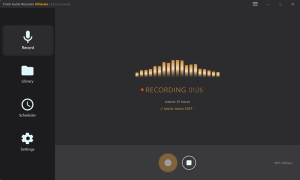
Desktop recorders capture system audio while Yandex Music plays. That is slower than a fake one-click downloader, but it is often more predictable than unstable websites and browser tricks.
Best fit: your priority is a movable file and you can use a desktop.
Poor fit: you only need short-term offline playback inside the app.
Steps:
- Install a desktop audio capture tool.
- Set output to MP3 and choose the save folder.
- Test 20 seconds first.
- Mute notifications and close noisy apps.
- Play the song from Yandex Music and record it.
- Save the file and verify that it is the right track.
Why people keep coming back to this:
- it creates a real file
- it does not depend on one site staying alive
- it is easier to understand than scripts
What usually goes wrong:
- wrong input captures silence
- system sounds get recorded
- metadata cleanup takes extra time
- source quality still limits the result
Quick take: if you want stable files, start here.
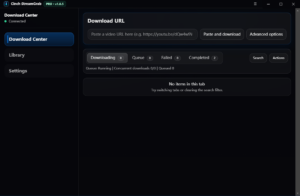
Method 3: Third-party downloader apps or tools
This sits in the awkward middle. It feels easier than recording, but less trustworthy over time.
Some users try unofficial downloader apps or lightweight tools that promise file export from Yandex Music. The appeal is obvious. The problem is that these tools can age badly, break after service changes, or create region/account headaches.
Best fit: you are willing to test a low-trust tool cautiously.
Poor fit: you want a workflow you can rely on for months.
Steps:
- Inspect the tool before installing it.
- Check update recency, reviews, and permissions.
- Test on one disposable track first.
- Verify file quality and song identity.
Why people still try it:
- often free or cheap
- can be quicker than recording when it works
- feels simpler than scripts
Why it fails as a long-term habit:
- maintenance is uncertain
- trust and safety vary wildly
- region behavior can change usefulness overnight
Quick take: acceptable only as a careful experiment.
Method 4: Online converter sites
This route is for readers who want a free fallback for one or two songs and accept a messier experience.
On paper it looks easy: paste a link, click convert, grab an MP3. In practice you often get the wrong match, a redirect maze, or a file that sounds rough.
Best fit: you want a free one-off try and will inspect the result manually.
Poor fit: you want a serious workflow for a larger library.
Steps:
- Copy the Yandex Music link or search the exact track manually.
- Paste it into the converter.
- Check the result before downloading.
- Play the file immediately instead of trusting the title alone.
Why it stays tempting:
- free entry point
- no desktop setup
- sometimes good enough for one song
Why it turns ugly fast:
- wrong-song matches are common
- ads and fake buttons waste time
- quality varies wildly
- uptime changes all the time
Quick take: use it only when free access matters more than a clean workflow.
Method 5: Scripts and advanced workflows
This route is only for technical users who accept maintenance as part of the deal.
Script-based workflows can be flexible, but they also carry the usual script tax: dependencies break, selectors change, region requirements shift, and the whole setup becomes a repair hobby.
Best fit: debugging is not a surprise to you.
Poor fit: you want results tonight.
Typical path:
- Find a maintained codebase with visible recent activity.
- Read the issues before trusting the README.
- Test a single track first.
- Expect to fix dependencies or selectors yourself.
Why advanced users still like it:
- can be batch-friendly
- offers more control than online tools
- may fit an existing automation workflow
Why most readers should stay away:
- breakage is normal
- community code can disappear fast
- region/account issues add extra friction
Quick take: smart only if you already enjoy maintenance.
Which Method Fits Which User
| Your situation | Start with | Do not start with |
|---|---|---|
| You already pay for Yandex Music and just want offline playback on your phone | Official offline mode | Scripts or online tools |
| You want MP3 files for car stereo, USB, or a local collection | Recording tools | Official offline mode |
| You refuse to pay and only need a few tracks | Online tools, cautiously | Scripts |
| You like tinkering and can debug broken tools | Third-party tools or scripts | Random converter sites as a long-term workflow |
| You care about clean long-term ownership | Buy music from stores that sell files | Fighting app cache workarounds forever |
If you map it to real situations, the choice gets easier:
- Commuter listener: if the app is enough, stay in the app.
- Local library builder: do not confuse access with ownership. Recording is slower, but it actually gives you a file.
- Technical workaround user: scripts are fine only if maintenance does not annoy you.
Region, Account, and Legal Boundaries
The official app stays on the low-risk side. Everything else adds some mix of copyright, terms-of-service, account, or quality uncertainty.
- Official offline mode is still the safest route.
- Third-party downloading, recording, or automation may raise service-term or copyright questions depending on where you live and how you use the files.
- Region and account conditions can affect how well unofficial tools work.
- Personal offline listening is not the same thing as redistribution.
If you need music for public sharing, resale, or commercial use, stop improvising and buy legitimate files.
FAQ
Can Yandex Music export songs as normal MP3 files?
No. Official Yandex Music offline access is not the same as open MP3 ownership.
What is the safest way to listen offline?
Official offline mode inside Yandex Music. If your goal is just listening inside the app, that is the clean answer.
What if I need MP3 files for another device?
Use a recording workflow first. It is slower than shortcuts or online tools, but usually more predictable.
Are free online Yandex Music downloaders worth trying?
Only as a low-trust fallback for one or two songs.
Are script methods better than online tools?
Only for people who can maintain them. For most readers, they are not calmer than recording tools.
Start Here
If you are stuck, use this order:
- Need offline only inside the app? Use official offline mode.
- Need a real MP3 file? Use a desktop recording tool.
- Need a free one-off fallback? Try an online or downloader tool, but stop after repeated failures.
- Thinking about scripts because they sound smarter? Only continue if you are happy debugging broken code.
- Need clean long-term ownership? Stop fighting the platform and buy music from a store that sells downloadable files.
What this guide is based on
- Official Yandex Music help pages and app behavior descriptions for offline listening
- Community discussions about app-bound downloads and the need for portable files
- Third-party tutorials covering recording workflows, downloader tools, and script-based workarounds